


The Power Of A List
In my role at Ex Libris, I am addressing the challenge of encouraging students to engage more with academic articles they discover during searches. My project focuses on identifying and overcoming the barriers that lead students to overlook these articles, mainly due to their immediate task focus or required reading lists. The goal is to enhance the educational experience by increasing the breadth and depth of student interactions with diverse academic content on our platform. Start date: September 14th 2023.
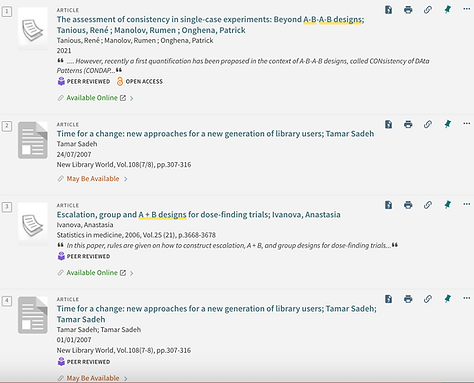
Normal Search Results
While students may need to focus on required readings like "Escalation, group and A + B designs for dose-finding trials," they often encounter and show interest in additional articles, such as "Time for a change...library user." My objective is to intelligently redesign our search interface to facilitate deeper exploration and interaction with these serendipitously discovered articles, enriching the overall academic experience. A major focus for work was to avoid cognitive overload in the UI other than slight cosmetic adjustment.
Adding "The Button"
Reflecting on the 35+ student user interviews, it became clear that a key feature was missing in our interface: a simple and efficient way for users to save articles of interest for later reference. To address this, we introduced a 'Add to Reading List' button on the search page. This button allows users to quickly add articles to a personalized list, which they can easily access at any time. This enhancement in the UI aims to significantly improve the user experience by ensuring that valuable articles are not lost and can be revisited when convenient for the user.

Implementation Phase
In response to user feedback, we introduced a 'Add to Reading List' button to our UI, designed to enhance the user experience by allowing easy bookmarking of interesting articles for future reading. We are currently conducting A/B testing to determine the most effective implementation of this feature:
-
Version A: The 'Save for Later' button is constantly visible next to each article in the search results. This version tests the effectiveness of a persistent visual cue for saving articles.
-
Version B: The button appears only when a user hovers over an article. This approach aims to reduce visual clutter and prevent users from being overwhelmed by too many options, potentially leading to a more focused and less distracting experience.
Ongoing Results
As we are still in the midst of A/B testing, definitive results are not yet available. However, preliminary observations suggest differing user behaviors:
-
Visibility vs. Distraction (Version A): Early feedback indicates that while the always-visible button aids in reminding users to save articles, it might also contribute to a cluttered interface, potentially leading to decision fatigue and an overloaded reading list for later.
-
Subtlety and Focus (Version B): Initial responses show that the hover-triggered button is less intrusive, maintaining a cleaner interface. However, there's a concern that its subtlety might lead users to overlook the feature, especially those who skim through search results quickly.
Anticipated Outcomes
Our primary aim is to strike a balance between visibility and unobtrusiveness. We hypothesize that:
-
Version A might lead to a higher rate of articles being saved, but could also result in overloaded reading lists, reducing the likelihood of users returning to the saved articles.
-
Version B may offer a less distracting experience, but the reduced visibility of the saving option could lead to fewer articles being bookmarked.
Conclusion
The ongoing A/B testing will provide valuable insights into user preferences and behaviors, guiding us in optimizing the 'Save for Later' feature. Our goal is to ensure that this tool enhances the educational experience without adding unnecessary complexity or distraction to the user interface. We anticipate that the final implementation will significantly contribute to a more efficient and user-friendly academic research process.